10 PPT Skill Workflows for AI Slide Decks
Compare 10 PPT skills for AI slide decks: outline, generate, convert docs, control brand, make charts, write speaker notes, and catch review risks.
By Bruce Yang • Editorial methodology
Published: 2026-05-13 • Updated 2026-05-13
Summary
The best PPT skills are not the flashiest prompt-to-deck generators. They are repeatable workflows that turn rough inputs into a clearer argument, editable slides, stronger evidence, and a deck a human can defend. Start with outline, narrative, source compression, brand control, and critique before you trust a polished first draft.
Execution paths from this guide
Move from reading to action: validate by task intent, compare alternatives, then open tool reviews for final checks.
Browse by task • Compare • Tools • Deals
Priority tasks: Presentation tasks • Slide design tasks • Content writing tasks
Priority compares: ChatGPT vs Gemini • Claude vs Gemini
Priority tool reviews: ChatGPT review • Gemini review • Claude review
BLUF: fix the deck before decorating it
A useful PPT skill turns an unclear input into a deck with a sharper message, cleaner structure, and fewer review risks. Prompt-to-deck generation is only one workflow. For business decks, the highest-leverage skills often happen before and after generation: outlining, narrative shaping, source compression, brand checks, data explanation, speaker notes, and critique.
Skill, tool, and Agent Skill are not the same thing
The boundary matters. Anthropic documents a pre-built PowerPoint Agent Skill using the pptx skill ID for creating, editing, and analyzing presentations. Most AI presentation products are not Agent Skills; they are tools with useful slide workflows. Calling every AI slide feature a PPT skill blurs the evidence. The safer question is whether the workflow improves the deck artifact: clearer argument, better audience fit, editable slides, stronger evidence, and less review churn.
Official examples are weak evidence
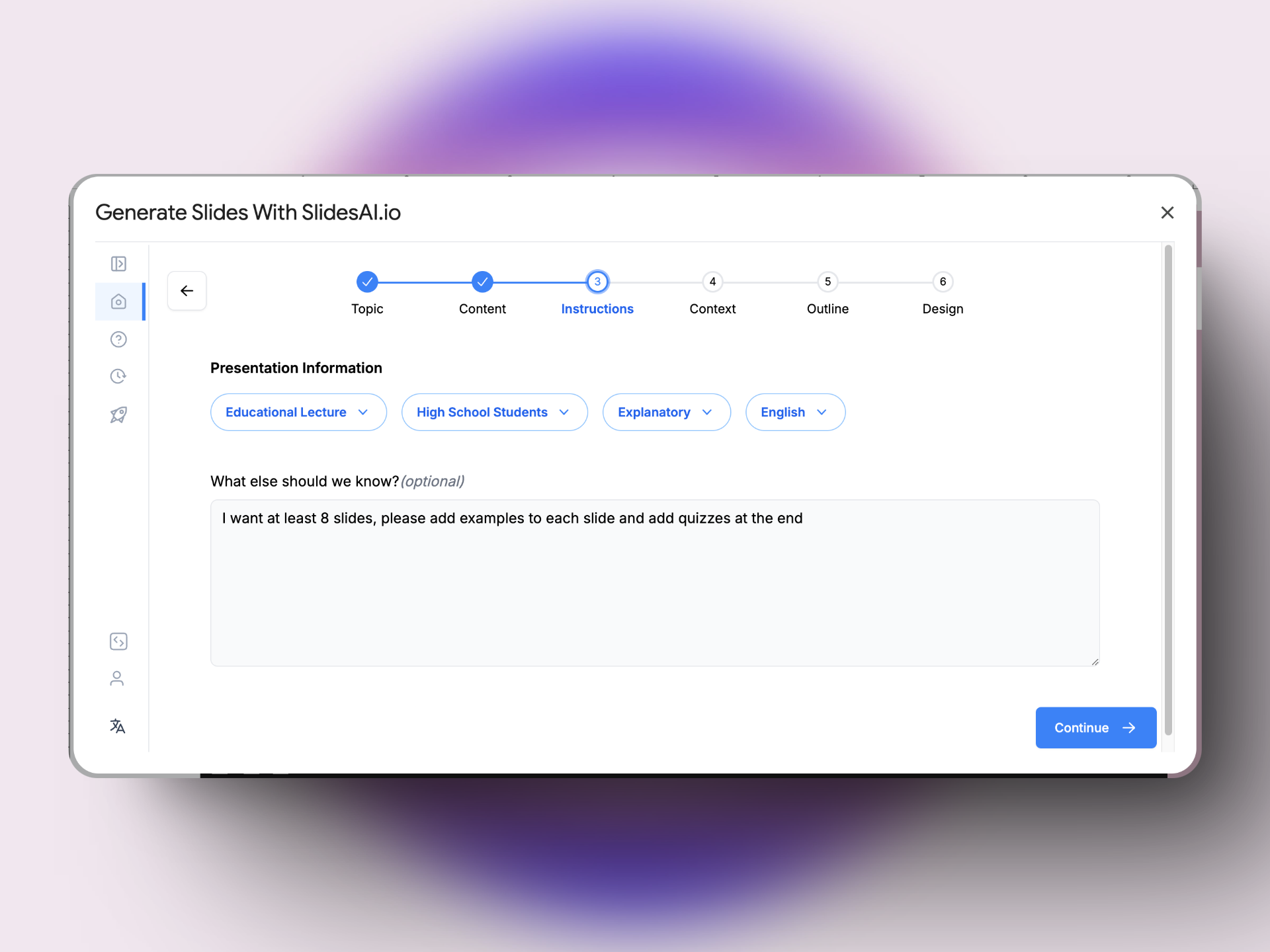
Official screenshots are useful, but they are not proof that the generated deck is good. The examples below mostly show workflow entry points or configuration screens. The Plus AI image is a partial prompt box, while the SlidesAI and Beautiful.ai images show settings before generation. Treat those images as evidence about controls, not evidence about final slide quality. Ask for a full exported deck, readable slide samples, source-material handling, and edit-mode screenshots before trusting the workflow.
Priority order for most teams
Start with brief-to-outline, narrative arc, document-to-presentation, review and critique, and brand consistency. These skills reduce the most expensive failure modes: vague purpose, crowded slides, unsupported claims, off-brand layouts, and decks that look finished before the argument is ready. Prompt-to-deck generation becomes more useful after those gates exist.
Use this matrix before choosing a PPT skill workflow.
| Workflow | Use when | Best output to inspect | Main failure mode | Human review |
|---|---|---|---|---|
| Brief-to-outline | The request is vague or political. | Deck objective, audience, section flow, excluded ideas. | A neat outline that avoids the real decision. | Required |
| Document-to-presentation | You have a report, PDF, transcript, or long notes. | What was compressed, removed, and promoted to slide titles. | A crowded slide dump that preserves too much source detail. | Required |
| Prompt-to-deck | You need a fast first draft from a clean brief. | Exported deck, edit mode, and slide-by-slide story logic. | Polished filler that looks complete before it is true. | Required |
| Brand-consistent design | The deck must look like your company made it. | Template use, typography, color, spacing, visual density. | Pretty slides that break brand rules or resist edits. | Required |
| Data-to-chart | The deck depends on metrics or operating updates. | Chart type, claim sentence, caveats, and source labels. | A confident chart attached to a weak or unsupported claim. | Required |
| Review and critique | You already have a deck and need a safer final pass. | Slide-specific issues, impact, and concrete fixes. | Generic feedback that never names the slide or risk. | Required |
1. PowerPoint and PPTX agent skill
This is the closest literal match to PPT skill. A PowerPoint or PPTX agent skill works with the presentation file itself: creating slides, editing existing content, and analyzing deck structure. It is valuable when the output must stay in a real .pptx workflow. Treat it as a document-operation skill first, not a replacement for narrative judgment, brand voice, or claim review.
2. Brief-to-outline skill
This workflow turns a rough request into a structured deck plan: audience, goal, main message, section flow, slide count, evidence needed, and what should stay out. It matters because many slide projects fail before design starts. A strong outline skill asks for missing context instead of rushing into layouts.
3. Prompt-to-deck generation skill
Prompt-to-deck generation is the visible workflow: provide a topic or brief and receive an initial presentation. Gamma, Canva, Microsoft Copilot, Beautiful.ai, Plus AI, and similar tools all address parts of this job. Use it for speed, but judge the result by second-draft quality: whether the deck has a clear argument, whether layouts support that argument, and whether your team can revise the file without rebuilding it. The main risk is polished filler.

4. Document-to-presentation skill
Many real decks begin as Word documents, PDFs, notes, reports, transcripts, or long outlines. A document-to-presentation skill compresses that source material into slide structure. The hard part is not conversion; it is deciding what the audience should remember. Inspect what gets removed. The output should preserve hierarchy, separate main points from supporting detail, and avoid turning a report into a crowded slide dump.
5. Narrative arc skill
A narrative skill turns scattered points into a persuasive sequence. It is especially useful for strategy reviews, sales decks, fundraising, product launches, and leadership updates. The output should create movement: current state, problem, insight, options, recommendation, risk, and next step. If the workflow only groups facts into sections, it has not solved the deck problem.
6. Brand-consistent slide design skill
Teams do not just need slides. They need slides that look like they belong to the company. A brand skill applies templates, colors, typography, visual density, approved wording, and layout expectations. Canva frames generation as a first draft that can be edited and branded, while Beautiful.ai emphasizes controlled slide structure. The evaluation question is direct: can the workflow keep brand standards visible after generation, or does the team have to rebuild the deck?
7. Visual concept skill
A visual concept skill suggests the right shape for the idea: timeline, funnel, matrix, workflow, before-and-after, architecture map, comparison, or metric chart. This is not decoration. The useful version chooses a visual because it clarifies the slide without the presenter standing there. Avoid workflows that add generic graphics just because empty space looks unfinished.
8. Data-to-chart skill
A data-to-chart skill turns metrics, survey results, financials, or operating updates into chart recommendations and plain-language takeaways. It should identify the right chart type, name the one sentence the chart supports, and warn when the data is too thin. This workflow matters because charts can look authoritative even when the claim behind them is weak.
9. Speaker notes and talk track skill
A deck is not only a file. It is something a person has to present. A talk-track skill creates speaker notes, transitions, timing, and optional backup explanations. It is useful for webinars, training, demos, conference talks, and sales calls. Good notes sound like a prepared human explaining the point. Weak notes simply read the slide back in longer sentences.
10. Review and critique skill
Review may be the highest-leverage PPT skill because it improves work you already have. It should flag weak logic, unsupported claims, overloaded slides, unclear charts, mismatched audience assumptions, and missing definitions. The best critique names the slide, the issue, why it matters, and the fix. This is where safety and quality gates matter most, because a beautiful deck can still be wrong.
Bonus: repurpose and localization skill
Many decks become other assets: a sales one-pager, webinar outline, internal memo, blog post, training handout, or localized market version. A repurpose skill adapts structure instead of merely shortening text. A live pitch, a PDF leave-behind, and a regional enablement deck need different pacing. This workflow is often less flashy than generation, but it saves teams time after the first deck ships.
How to compare PPT skills
Run the same source brief through three candidate workflows and score the outputs on five factors: story clarity, slide editability, brand fit, source compression, and review risk. Do not judge only the first draft. The better skill is often the one that asks better questions, exposes missing evidence, and gives you a cleaner second draft. Keep a small evidence log with the source brief, official example link, exported slide screenshots, edit time, and the specific weakness you found. For production teams, editability beats spectacle.
Primary Sources
These links point to the official product and documentation pages reviewed for this guide.
Frequently asked questions
Are these the definitive most popular PPT skills?
No. This is an editorial guide to common and useful PPT skill workflows, not a verified global ranking. Popularity changes by platform, team, and use case, so the safer question is which workflow solves your deck problem best.
What is the difference between a PPT skill and an AI presentation tool?
A PPT skill is a workflow or capability, such as outlining, document conversion, slide critique, or speaker-note drafting. An AI presentation tool is the product that may provide one or more of those skills. Some true Agent Skills also work directly with PowerPoint files.
What is the best PPT skill for business presentations?
Start with brief-to-outline and narrative arc skills before generating slides. Business decks usually fail because the argument is unclear, not because the formatting is weak. Once the story works, visual, data, and talk-track skills become more useful.
How should I judge official PPT skill screenshots?
Treat official screenshots as workflow evidence, not output proof. A prompt box or settings panel tells you what inputs the tool collects. It does not prove the final deck is readable, editable, on-brand, or accurate. Ask for exported slide samples and edit-mode evidence.
Can AI PPT skills replace a presentation designer?
Usually no. They can speed up outlining, drafting, critique, and visual planning, but final judgment still matters. A human should check whether the deck is accurate, brand-safe, visually balanced, and appropriate for the room.
What is the biggest risk with AI-generated slide decks?
The biggest risk is confident filler. AI can make a weak deck look complete by adding polished language, generic visuals, and smooth transitions. Strong PPT skills should make gaps more visible, not hide them.
Related Guides
Explore related tools
Use the directory to compare tools, evaluate offers, and browse by task.